Shared Sign-on Across Your Estate

The guest WiFi experience should be effortless — a true one-and-done sign-in. With Fydelia’s Shared Sign-On, it is. Once a guest connects at any one of your venues, they’re automatically recognized and securely connected at every other location within your Fydelia network. No repeat forms. No friction. Just instant access.
What you will achieve is: Seamless journeys. Smarter data. Stronger loyalty.
Prerequisites: You need to be logged into your Fydelia account first. Click here for the how-to.
Remove barriers to connection with seamless cross-venue authentication while improving guest satisfaction and increasing repeat engagement across your entire estate — from first visit to every return.
Finding Your Splash Page
1. Switch accounts - If you are a reseller managing a multi-tenanted account, each organisation shows as a new account in Fydelia. They are created automatically. To switch between them, just use the drop down.

2. Viewing your splash pages - To view your splash pages click the List Pages from the Splash Pages menu.

3. Find the folder containing the splash pages you wish to group together for Shared Sign-on. In this example we're using the Default Folder (1). Click the cogwheel (2).
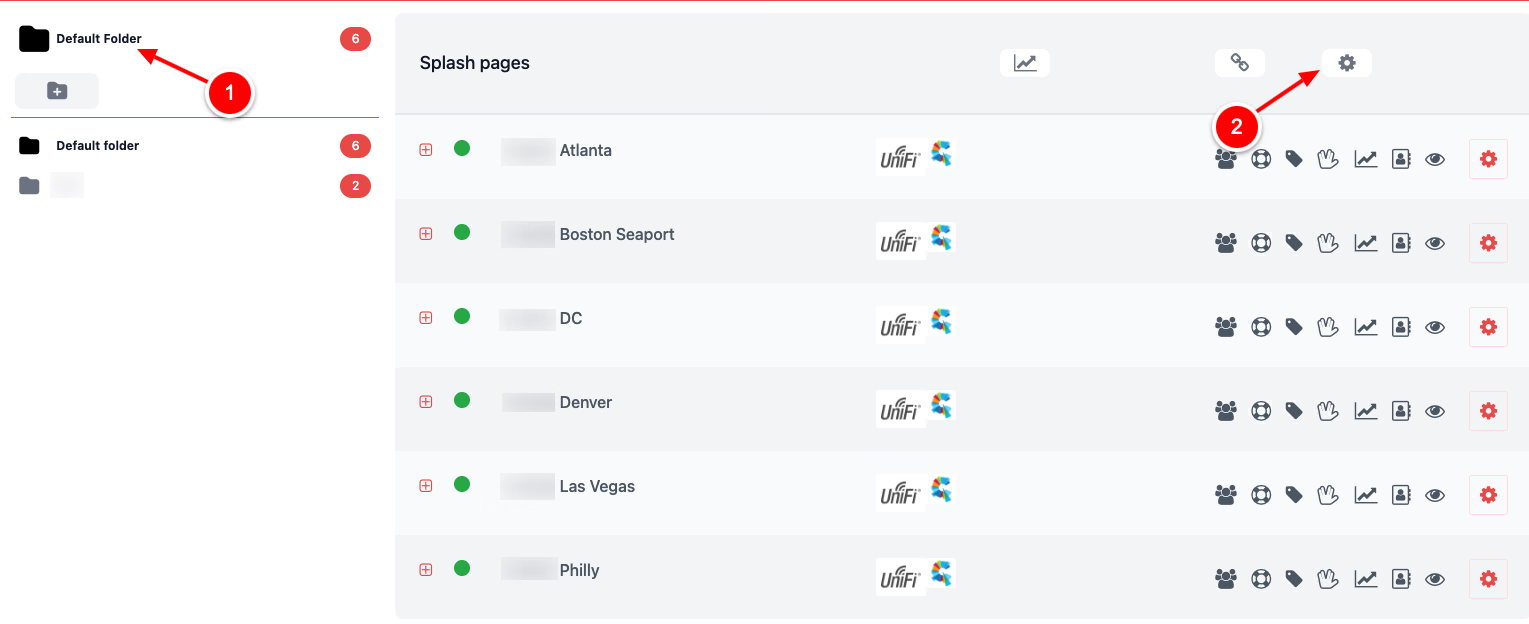
You can create as many folder as you need and move your splash pages to the relevant folder to group them.
4. In the dialog box that pops up, click Shared Sign On (1) and then Save (2). That's it! You're all set.

When your guest visits another location that is in your group (folder), they will be presented with a Welcome back! screen and connected to your WiFi automatically. This reduces the chances of them opting out if they've previously opted in. Fydelia pushes this data to your CRM as a return visit.